
What Is Line Assignment?
Lines acquired by your organization live at the org level until an Admin distributes them. In Linq Zero, you manage this through the Phone Number Mapping section — a dedicated space for pairing each line with the right team member so they can start sending and receiving messages.
Note: The number of lines you can assign is limited by the seats included in your organization's subscription.
Before You Start
Make sure you have:
- An active Linq Blue subscription
- Admin access to Linq Zero
- At least one line is available to assign
- The members you want to assign lines to have already been added to your organization
How to Assign a Line
Step 1 — Open the Organization Panel
In Linq Zero, look for the Organization icon on the bottom-left of the sidebar (it looks like a grid/app icon).
Once inside, you'll see two options in the left panel:
- Phone Number Mapping
- Member Management
Select Phone Number Mapping.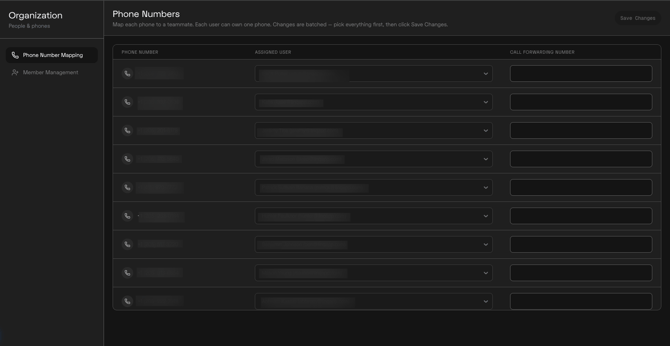
Step 2 — Find the Line You Want to Assign
You'll see a list of all the lines your organization owns. Scroll through the list to find the number you'd like to assign.
Unlike the Linq App, there is no search bar on this screen — scroll through the list to locate the number.
Click on the toggle next to the line you want to assign. This expands the assignment options for that number, showing you the members available in your organization.
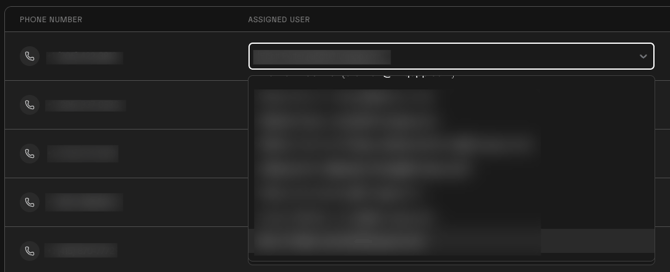
Step 4 — Select a Member
From the expanded options, select the member you want to assign the line to. Their name will be pulled from your organization's member list.
Step 5 — Confirm the Assignment
Confirm your selection. The line will now be mapped to that member, and they'll be able to use it within Linq Zero.

Key Differences from the Linq App
Linq Zero's line assignment experience is intentionally simpler and more streamlined. Here's how it compares:
| Feature | Linq App | Linq Zero |
|---|---|---|
| Navigation path | Dashboard → Phone → Numbers | Organization → Phone Number Mapping |
| Search for numbers | Yes (search bar) | No (scroll through list) |
| Right-side panel | Yes — "Manage Work Number" | No — inline toggle |
| Unpair / Call Forwarding options | Yes | No |
| Reassign label | "Reassign Users" | Same toggle interaction |
| Interface theme | Light | Dark |
Things to Keep in Mind
- Only Admins can assign or reassign lines in Linq Zero.
- The number of lines you can assign is tied to your subscription's seat count — you cannot assign more lines than you have seats.
- If a line is already assigned to someone, selecting a new member through the toggle will move the line to them.
- Members must already exist in your organization before they can be assigned a line. If the member you need isn't showing up, add them first through Organization → Member Management.