
How Do I Use the Linq Hub?*
The Linq Hub is your go-to tool for sharing information instantly in a physical space. Each Hub is NFC-embedded and QR-enabled—so visitors can simply tap or scan to go straight to your Linq page.
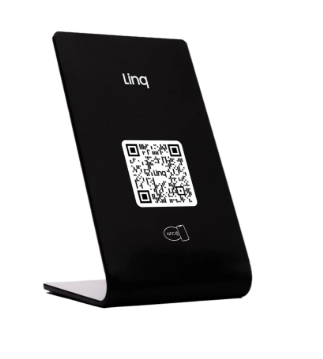
Use it to:
-
Show off new inventory
-
Link to a menu or order form
-
Promote a trade show offer
-
Capture leads or share resources in high-traffic areas
Activate Your Linq Hub
-
Scan or tap the Hub
-
Use your phone’s NFC (tap) or camera/QR scanner (scan the QR code on the Hub).
-
-
Create or log into your Linq account
-
If you don’t have a Linq account yet, you’ll be prompted to download the app and create one.
-
If you already have an account, just log in.
-
-
Connect your Hub to a page
-
Choose the Linq page you want your Hub to open.
-
This page is where you’ll add everything you want people to see:
-
Links
-
Photos and videos
-
Contact information
-
Menus, documents, or forms
-
Promotions and calls to action
-
-
Once it’s connected, every tap or scan of the Hub will take visitors directly to that page.
Where to Use the Linq Hub
The Linq Hub shines in tabletop and high-traffic spots. Common uses include:
-
Convention booths – let attendees tap to get your info or promo
-
Trade show tables – collect leads or show product lines
-
Restaurant counters – link to menus, ordering, or review pages
-
Checkout stations – share loyalty programs, receipts, or follow-up offers
-
Open house coffee tables – provide property details or agent contact info
-
Bar tops – connect guests to drink menus, events, or social channels
You choose how to use it—the Hub is simply a flexible, always-on gateway to your Linq page.
*Note: an active Linq One subscription is required to activate and use any digital business card.