
Best Practices for Using Your Blue Number
Act Human
Treat your Blue number like your personal phone.
Send natural, personalized messages such as:
“Hey [Name], this is [Your Name]. Is now a good time to chat?”
Always text before calling to reduce the chance of being flagged as spam. A quick message like:
“Hey, it’s [Your Name], I’ll call shortly.”
Avoid generic terms like “test” or automated-sounding phrases.
Maintain Healthy Engagement
Send messages that prompt responses—higher reply rates help prevent your number from being flagged.
Keep message volumes reasonable and consistent. Spread conversations out naturally over time.
Response rate monitoring
-
We measure response rates over a 7-day time frame for new text conversations started with Linq Blue.
-
If your response rate falls to 15% or lower, Linq will begin to slow (throttle) outgoing texts from that Blue number to help prevent it from being flagged by Apple.
- The delay can start from 1 minute and go up to 30 minutes.
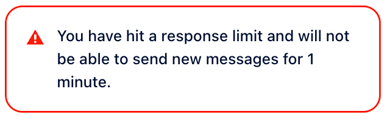
- The delay can start from 1 minute and go up to 30 minutes.
-
Improving your reply rate (more two-way conversations, fewer unanswered cold messages) will allow sends to normalize again.
Monitor Your Number’s Health
Occasionally call your own Blue number and have a brief conversation.
This demonstrates genuine usage and helps reduce spam flags.
Quality Over Quantity
Focus on meaningful, personalized interactions instead of blasting out messages.
High-quality communication performs better and helps keep your number safe.
Avoid Common Pitfalls
-
Don’t send large volumes of messages rapidly without getting replies.
-
Don’t run long sequences of one-way messages to contacts who never respond.